HomeReSpark Alternative
Compare Your Options

Looking For A ReSpark Alternative?

Compare BuyScrapSoftware with ReSpark on ticketing, compliance, dispatch, reporting, and pricing, so you can choose with confidence.

An Option Worth Evaluating

Choosing Between Scrap Yard Platforms?

ReSpark describes itself as one connected platform for scrap yards, covering purchasing, scale ticketing, inventory, sales, dispatch, and accounting. BuyScrapSoftware covers the same day-to-day work, built by a scrap metal dealer with 25+ years in the industry. Here is a side by side look at how the two compare.

Feature Comparison

BuyScrapSoftware vs ReSpark

Area
ReSpark
BuyScrapSoftware
Ticketing
Scale ticketing that captures weights, grades, deductions, and taxes, with signatures, photos, and ID scans on every ticket
Itemized ticketing with material grading, saved pricing, and photo attachments per line item
Compliance
Automatic LeadsOnline uploads and regional compliance reporting, with required field validation and audit trails
ID scanning, thumbprint logging, electronic signatures, and LeadsOnline integration
Inventory
Inventory and processing tracked across purchasing, sales, and logistics in one connected platform
Real-time inventory with full chain of custody and audit trail
Payments
Settlements, AR and AP, and finance and accounting included in its tiers
Check, cash, or digital payouts with customizable hold periods and cash drawer reconciliation
Dispatch
Standard Dispatch module, with a separate Logistics module available
Jobs, drivers, and containers on one dashboard, with a container map and inspections
Reporting
Real-time dashboards across purchasing, sales, inventory, logistics, finance, and operations
Dashboards by date range with breakdowns by material, supplier, and cashier
Scale Connectivity
Scale operations built into the platform, with alerts when scale exceptions occur
Connect a scale directly from the ticket screen
Hardware
Contact ReSpark for details
Touchscreen keypad, item photos, and seller ID capture on the ticket
Implementation
Contact ReSpark for details
Team-assisted setup with data transfer help and guided onboarding
Support
Contact ReSpark for details
Real support from a team that has run a scrap yard
Pricing
Priced per location per month with Essentials, Pro, and Enterprise tiers, and no per-user or per-ticket fees
Lite and Plus plans, with zero setup fees on select plans

Comparison based on features ReSpark publishes on their own site.

What Makes Us Different

Built By Real Scrap Yard Owners

25+ years of hands-on scrap yard experience built into the software, not guessed at
Built by people who have run a scrap yard, not just software engineers
Straightforward pricing with no long-term contracts holding you hostage
Setup and onboarding handled by a team that assists with your data transfer
See It In Action

The Real Product, In Action

Real screens from BuyScrapSoftware, straight from a working scrap yard. Customer, driver, and ID details are blurred for privacy.
app.buyscrapsoftware.com
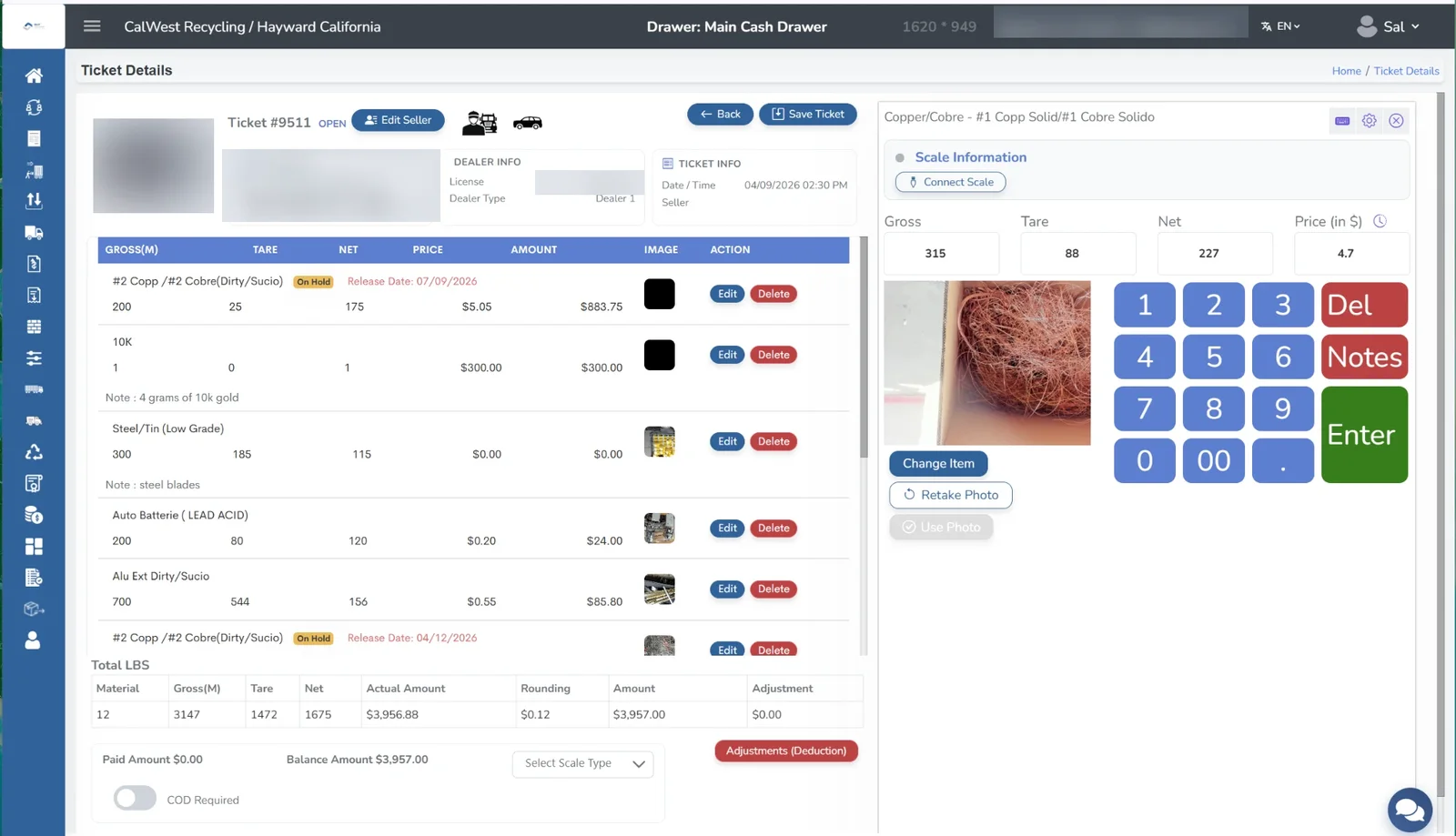
BuyScrapSoftware ticket details screen with graded materials, item photos, scale weights, and a keypad for entering price
01

Ticketing

Grade each material, attach a photo to every line item, and see gross, tare, net, and price on one screen. Connect a scale, keep the seller's ID on the ticket, and place items on hold with a release date.
app.buyscrapsoftware.com
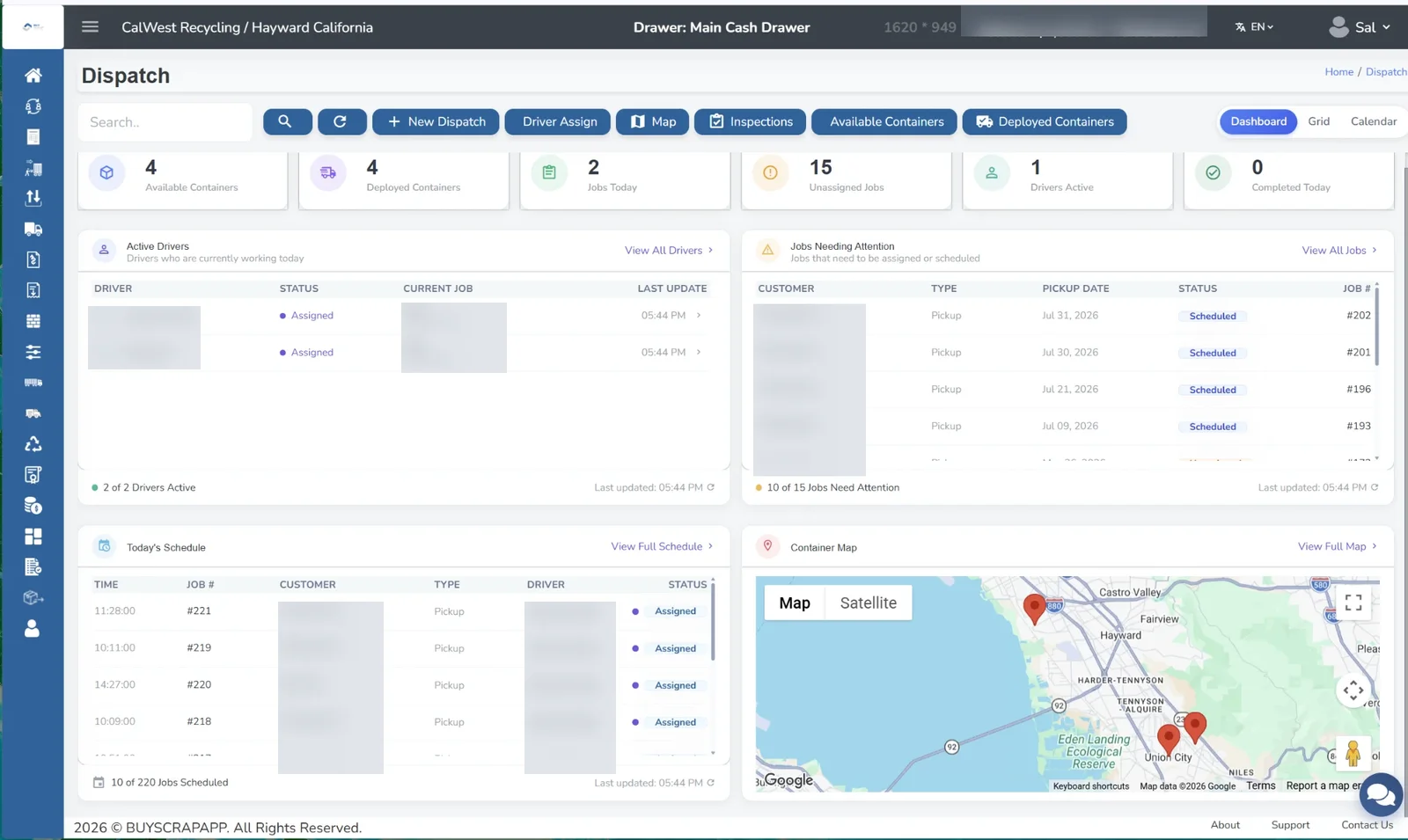
BuyScrapSoftware dispatch dashboard showing jobs, active drivers, today's schedule, and a container map
02

Dispatch

Assign drivers, schedule pickups, and track available and deployed containers on a map, with inspections and job status in one dashboard.
app.buyscrapsoftware.com
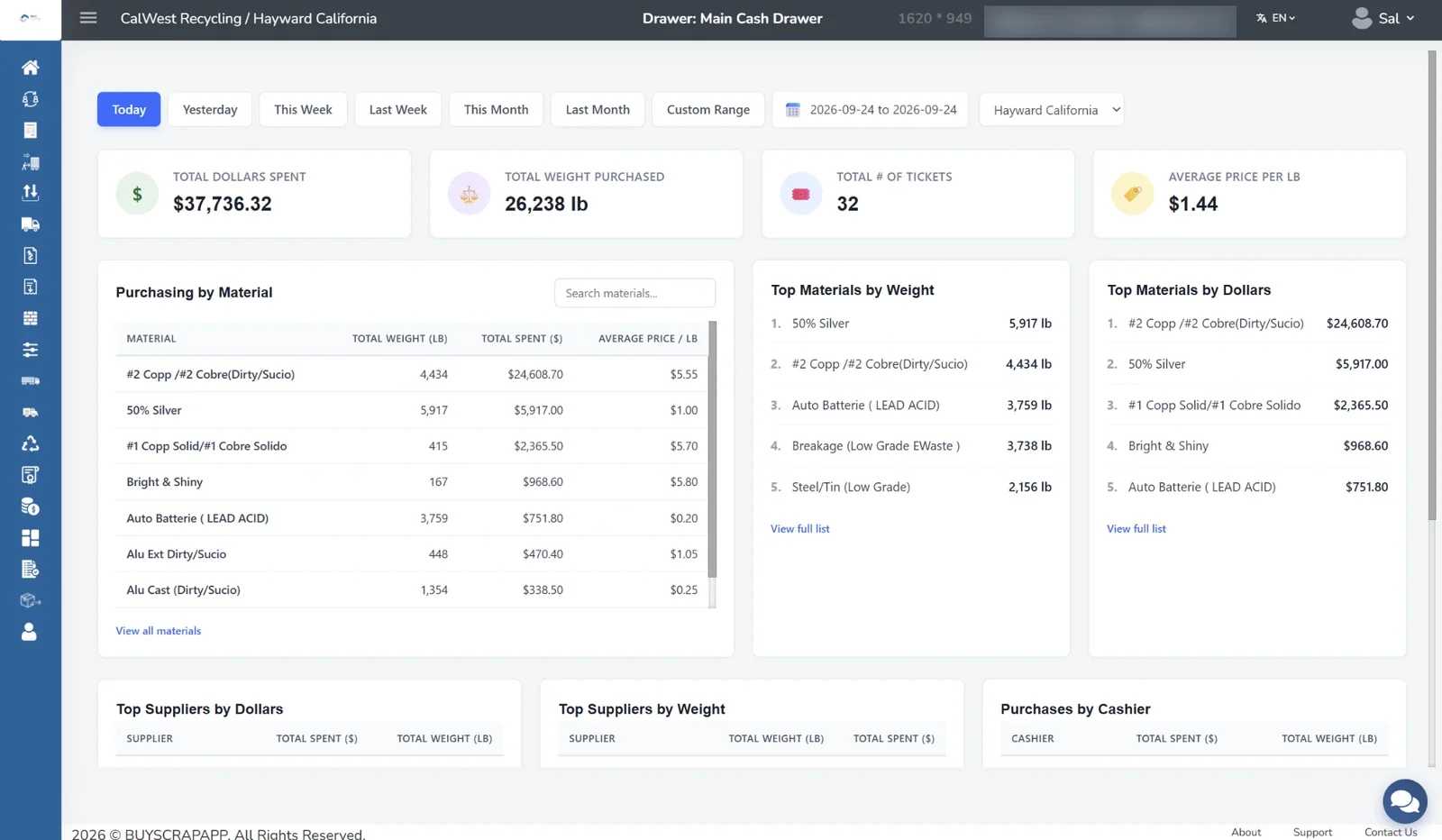
BuyScrapSoftware reporting dashboard with dollars spent, weight purchased, ticket count, and purchasing by material
03

Reporting

See dollars spent, weight purchased, ticket counts, and average price per pound for today, this week, this month, or a custom range, with breakdowns by material.
app.buyscrapsoftware.com
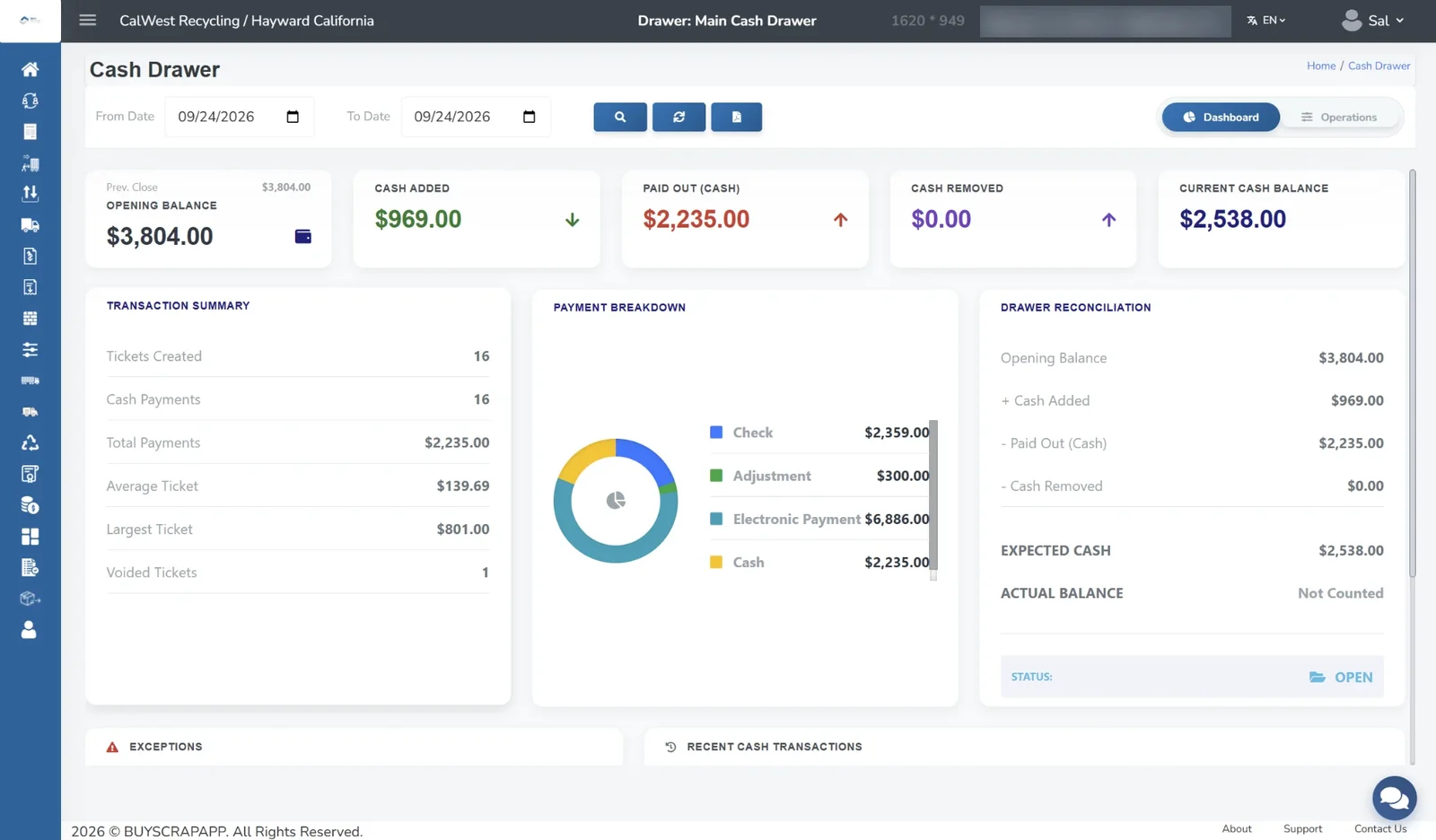
BuyScrapSoftware cash drawer screen with opening balance, cash paid out, payment breakdown, and drawer reconciliation
04

Cash Drawer

Track opening balance, cash paid out, and payments by check, cash, and electronic payment, with drawer reconciliation built in.
app.buyscrapsoftware.com
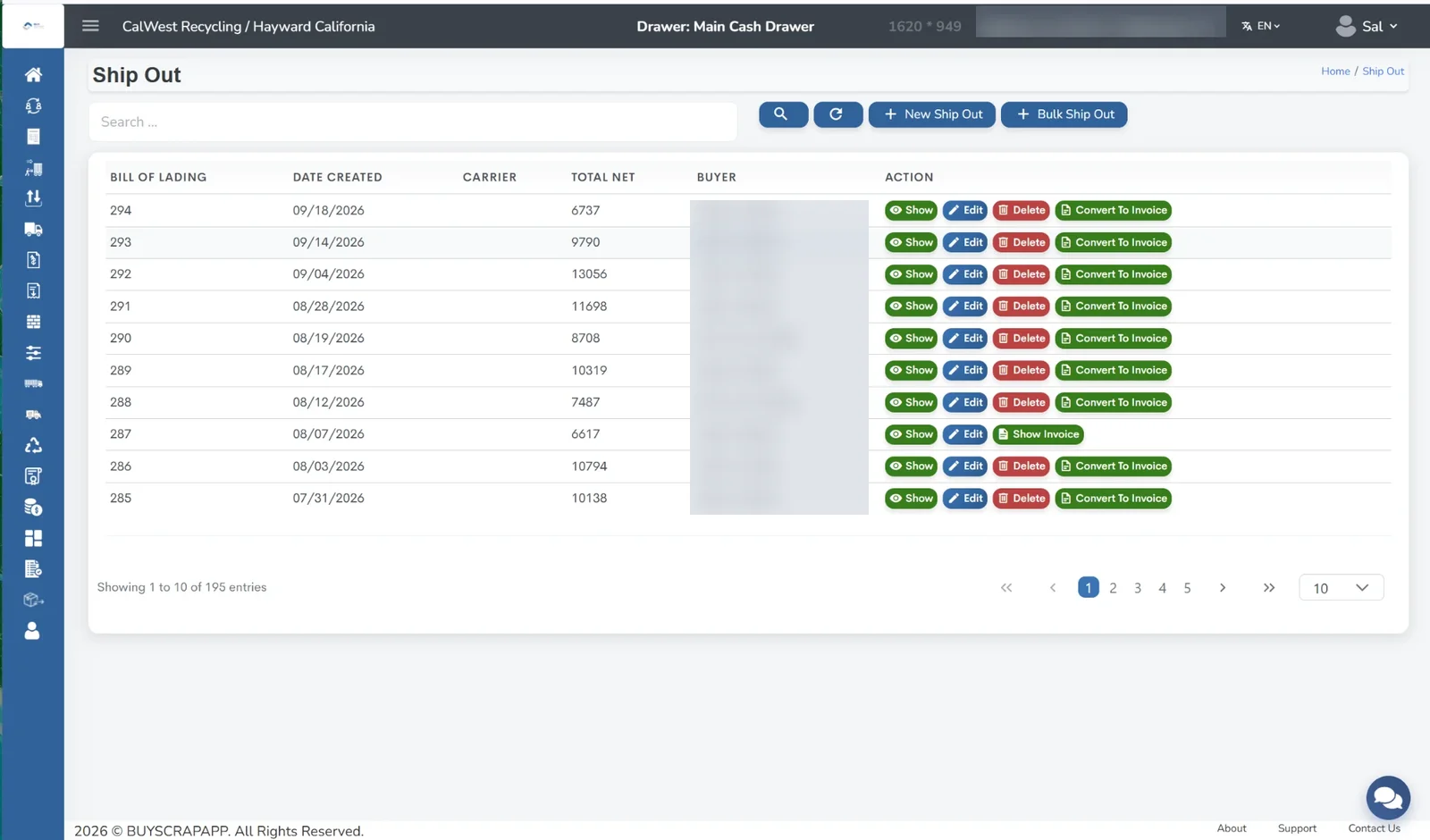
BuyScrapSoftware ship out screen listing bills of lading with options to convert a shipment to an invoice
05

Shipping

Create outbound shipments and bills of lading, then convert them to invoices when you are ready to bill.

Ready To See BuyScrapSoftware In Your Yard?

Book a free demo and see how it stacks up for yourself.